For Mac Windows Coming Soon

T9... butbetter

Fix typos. Correct grammar. Polish your tone.
All with one keyboard shortcut, right where you type.

  • Fix spelling mistakes
  • Correct grammar
  • Sound more professional
Download for Mac Free download. macOS 13 or newer.
3,887 texts butbettered since 2026
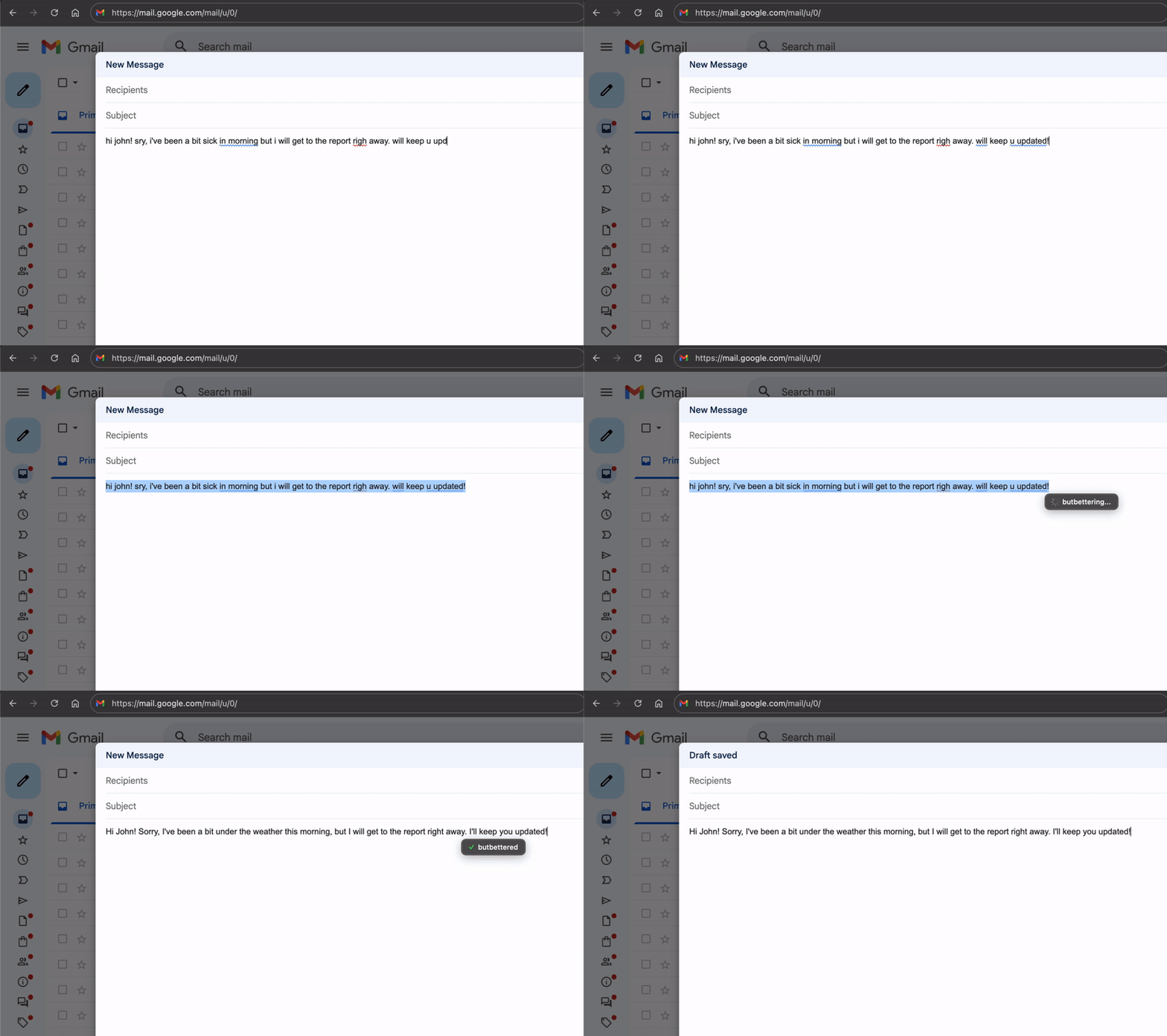
App screenshot
Real-time fixes, right where you type.

Try it yourself

Type something messy and see how butbetter transforms it

Hey, can you send me the report by Friday? It's really important. Thanks!

Remember the old days?

We've all been there — trying to write something important and not quite getting it right

  • Looking up words in a dictionary or encyclopedia
  • Googling "how do you spell..." for the hundredth time
  • Asking a friend "does this sound okay?"
  • Finding someone who speaks better English to check your message
  • Copy-pasting into ChatGPT, waiting, copying back...
  • Just hitting send and hoping for the best

Now imagine all of that... butbetter

Select your text. Press one shortcut. Your spelling is fixed, your grammar is corrected, and you sound exactly as professional as you want. Right where you typed it. In under a second.

  • Instant results
  • Works everywhere
  • No copy-paste needed

Works in every app

Anywhere you can type, butbetter works. No plugins, no extensions — just one shortcut.

Who is butbetter for?

Anyone who writes. Seriously — if you type words, butbetter makes them better.

Busy Professionals

Send polished emails without spending extra time proofreading

Non-Native Speakers

Sound natural and confident in any language you're learning

Busy Parents

Quick messages to teachers, doctors, and other parents — done right

Students

Better essays, emails to professors, and job applications

Small Business Owners

Professional customer communication without hiring a copywriter

Everyone Else

Anyone who wants to write faster and sound better

Use it for anything

butbetter helps wherever words matter

Works in any language

English isn't your first language? No problem. butbetter helps you sound natural and professional whether you're writing in English, Spanish, French, German, or any other language. It's like having a native speaker check your writing — instantly.

Why you'll love it

Three-in-One

Fixes typos, corrects grammar, and polishes your tone — all at once.

Lightning Fast

Your text is improved in less than a second. No waiting, no loading screens.

Works Everywhere

Email, messages, documents — anywhere you can type, butbetter works.

Your Tone, Your Choice

Slide from casual to formal. Match your message to your audience.

Private & Secure

No account needed. Your text is never stored on our servers.

Typos-Only Mode

Just want spelling and grammar fixes? Keep your own words and style.

Simple as 1-2-3

01

Select your text

Highlight the text you want to improve

02

Press the shortcut

One keyboard shortcut does the magic

03

Done!

Your polished text appears instantly

How It Works Screenshot

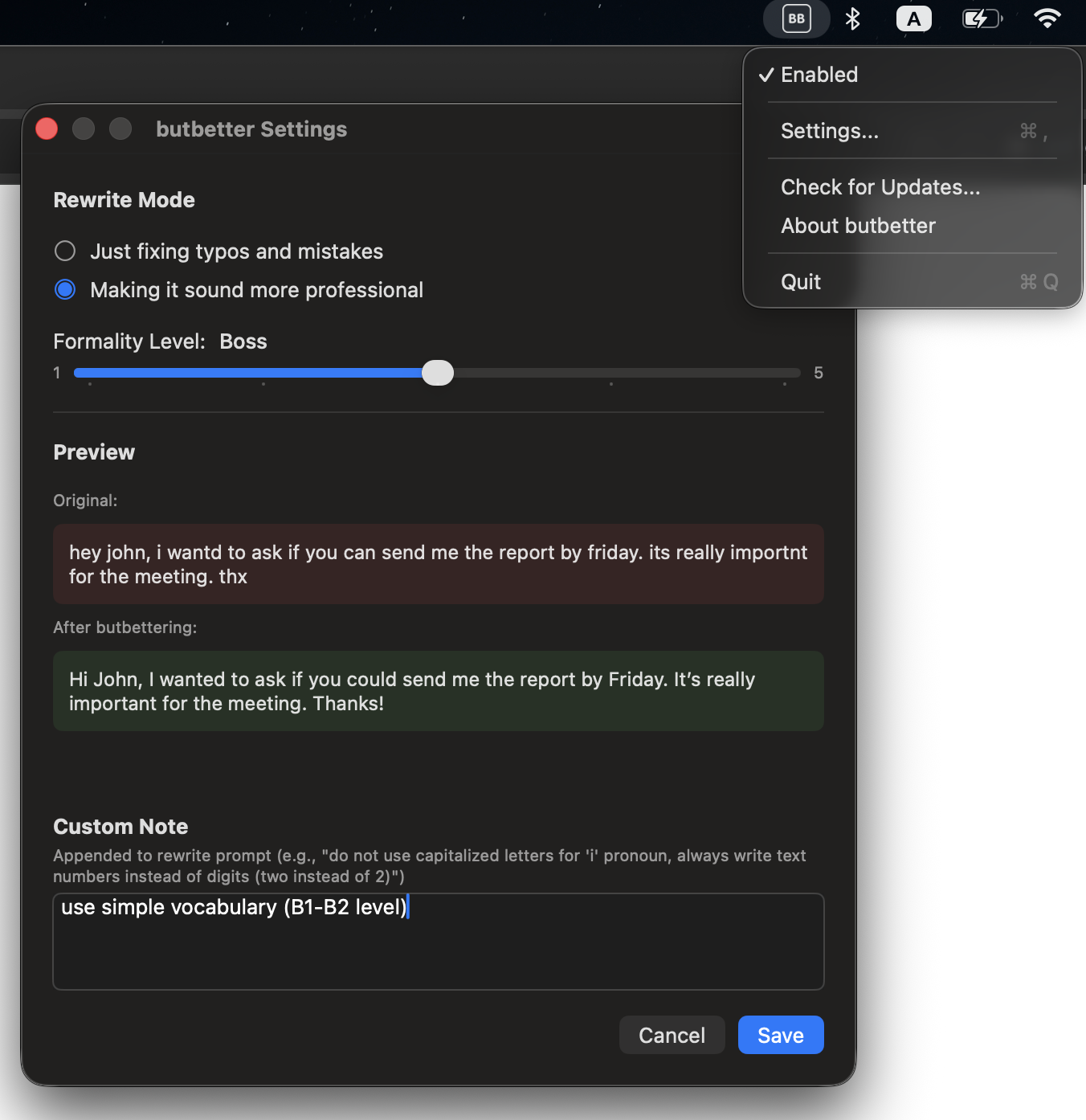
Easy to customize

Click the icon in your menu bar to adjust how butbetter works for you

Settings Screenshot

Questions & Answers

Is butbetter free?

Yes! butbetter is free to use with daily limits. A paid version without limits is coming soon — it will be a one-time payment, no subscription. Pricing is currently being finalized.

Is my text private?

Your text is never stored on our servers. To improve your text, we send it to OpenAI's API, which powers the rewriting. OpenAI may process your data according to their policies. Read OpenAI's Privacy Policy.

Do I need to create an account?

No. Just download and start using. No email, no password, no sign-up required.

What languages does it support?

butbetter works with any language that OpenAI supports — which is most major languages including English, Spanish, French, German, Italian, Portuguese, Chinese, Japanese, Korean, and many more.

Does it work offline?

No, butbetter requires an internet connection to process your text.

What are the daily limits?

The free version has generous daily limits that reset every 24 hours. For most users, this is more than enough for regular use.

Is there a Windows version?

Not yet, but it's coming soon! Stay tuned.

What macOS version do I need?

butbetter requires macOS 13 (Ventura) or newer.

Ready to write better?

Stop worrying about typos, grammar, and how you sound.
Let butbetter handle it for you.

Download for Mac Free download • macOS 13 or newer • Windows coming soon